ACE COMBAT 8 Parts Guide: BODY, ARMS and MISC Parts Explained
The ACE COMBAT 8 parts system after launch: BODY, ARMS and MISC categories, the per-aircraft slot economy, named parts and a 60-second pre-mission checklist.
FAQ
What does SELECT PARTS do in ACE COMBAT 8?
Can I change my wingmen's aircraft?
Can I change loadout mid-mission?
Does the whole flight share one aircraft type?
One screen, four decisions
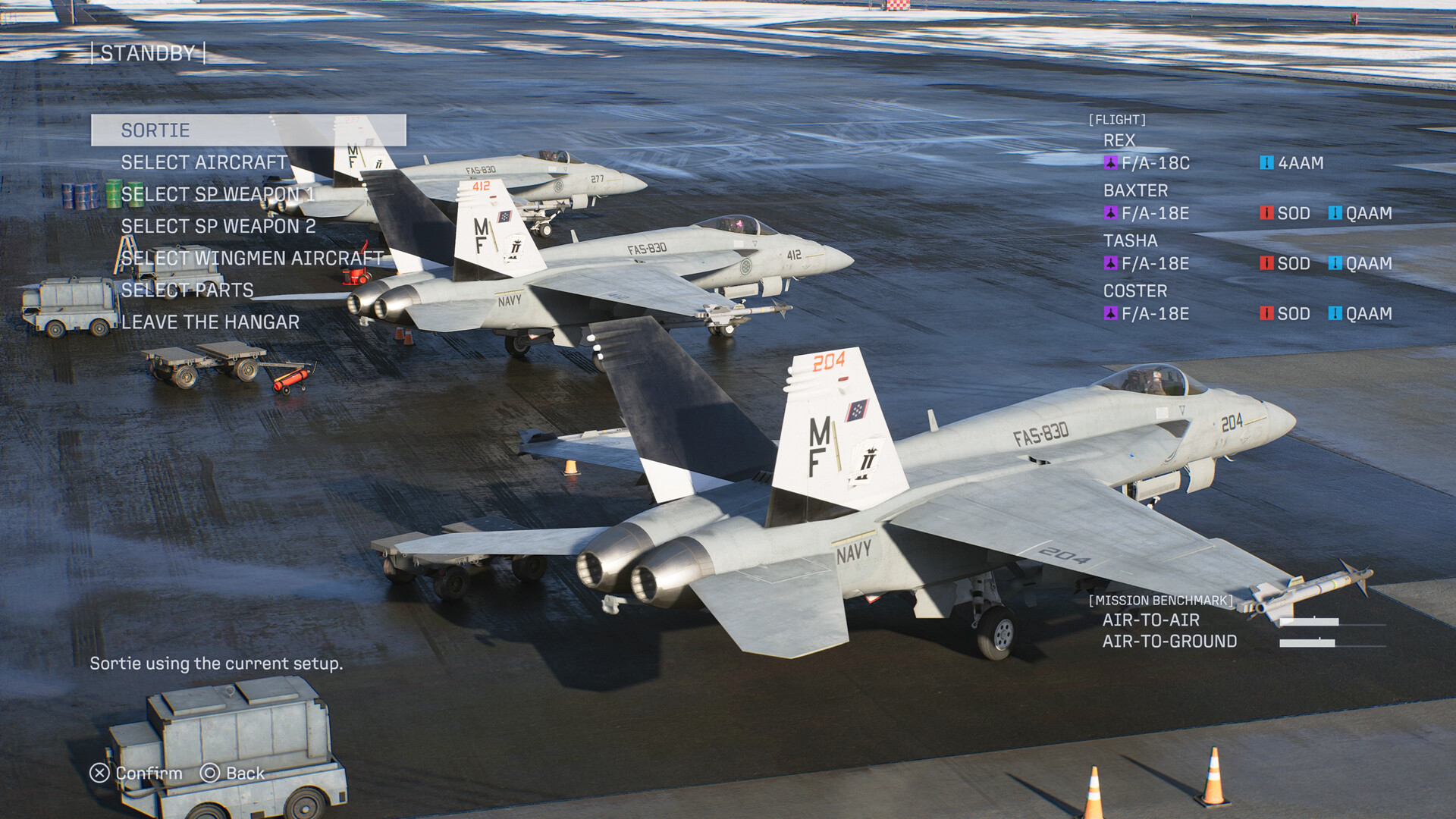
The standby screen is the strategic layer of ACE COMBAT 8. In older entries you picked a plane and one special weapon; here the same screen stacks four decisions — your airframe, two special weapon slots, your wingmen’s aircraft and their equipment, plus parts. The official screenshots show the menu over a live hangar deck, with the flight parked in staggered formation behind the UI.
Aircraft choice: role first, looks second
Your aircraft decides speed, handling and available weapons. The launch roster counts 34 aircraft across four roles — Fighter, Multirole, Attacker and Electronic Warfare — spanning everything from the F/A-18C to the Su-57. The full breakdown lives in the aircraft list, the starting aircraft guide narrows it down for your first campaign hours, and the best planes guide ranks the post-loadout unlocks.
Two rules hold from official material alone:
- Match the benchmark. The standby screen rates air-to-air and air-to-ground emphasis. A fighter with two multi-lock slots wastes half its kit on a ground-pounding mission.
- Let the second slot specialize. With two SP weapon rows, your airframe choice no longer forces an all-air or all-ground build — pick the airframe for flying characteristics, then split weapons across both slots (see the special weapons guide).
Wingmen are part of your loadout
SELECT WINGMEN AIRCRAFT is the quiet star of the menu. Your three-flight companions each take their own airframe and special weapons into the sortie. One official screenshot shows the flight roster with REX on an F/A-18C (4AAM), BAXTER on an F/A-18C (4AAM, LASM), TASHA on an F-2A (LASM, HVAA) and COSTER on an F-14D (LAAM, GPB) — a deliberate spread of anti-air and anti-surface coverage.
Two known systems interact here. First, the campaign’s story treats these pilots as people whose survival matters, and series tradition lets your choices affect whether wingmen make it home. Second, in-mission commands exist: screenshots show an SP WEAPON DISPERSE/ATTACK toggle and a “Dispersed Attack” radio call that sends the flight’s special weapons across multiple targets simultaneously. Equipping your wingmen with complementary weapons is what makes those orders effective — the aces and wingmen guide goes deeper.
Parts: the BODY, ARMS and MISC catalogue
SELECT PARTS appears in the sortie menu, and the catalogue is now known. Parts are purchased from the Aircraft Tree — the same MRP economy that unlocks aircraft — and organized into three categories:
- BODY — flight-performance parts. Named examples: the Lightweight Blisk (acceleration), the Airbrake Auxiliary Pressurization Device (deceleration), Next-Generation High-Pressure Components (top speed), the ECU Software Update (stall resistance plus longer high-G turns), the Flap/Aileron/Rudder Auxiliary Pressurization Devices (pitch, roll and yaw stability) and Fuel Tank Bulletproof Coating (durability).
- ARMS — weapon-tuning parts. The Target ID Accelerator (MSL) shortens standard-missile reload; Guidance Optimization Software improves missile tracking; the Air-to-Air and Air-to-Ground Electronic Optical Hybrid Sights speed up and extend special-weapon lock-on; Reinforced Mounts raise special-weapon payloads; and the bomb line gets High-Spec Explosive Charges, Extended Drop Racks and the New Bomb Rack Safety Device, which relaxes firing-angle restrictions.
- MISC — the oddball layer. The Main Structural Frame reduces terrain-contact damage, the Auto-Strafing Machine Gun Device fires whenever the gun reticle is up, the Onboard Self-Defense Jammer weakens enemy missile guidance, and the Drop Tank buys back range.
The headline mechanic is new for the series: unlike Ace Combat 7 or Infinity, each part consumes one slot of its category’s allotment, and that allotment depends on the aircraft. A big airframe takes more ARMS slots than a light one, so the aircraft you buy and the parts you fit are one decision, not two — the trade-off is explicit, in the same spirit as the two-slot special weapon system (see the special weapons guide). For the control bindings that fire those weapons once fitted, the controls guide maps every scheme.
A 60-second pre-mission checklist
- Read the benchmark: air-to-air, air-to-ground, or mixed.
- Pick the airframe whose handling suits that split.
- Fill SP weapon slot 1 for the primary threat, slot 2 for the secondary (multi-lock for drone swarms, precision for structures, anti-ship for vessels).
- Spread coverage across the flight: at least one wingman anti-air, one anti-ground.
- Adjust parts if the benchmark highlights a specific threat type.
- Sortie.
The score you earn with that loadout is counted by the systems in the score and ranking guide.
Related Articles
guides
ACE COMBAT 8 Controls: Standard vs Expert, PC Keys and Flight Sticks
Every ACE COMBAT 8 control scheme explained: Standard vs Expert flight models, the two-trigger speed action, PC keyboard keys, HOTAS support and the VR situation.
aircraft
ACE COMBAT 8 Aircraft List: All 34 Planes, Classes and Unlocks
The ACE COMBAT 8 aircraft list after launch: 34 planes in four roles, Aircraft Tree unlocks, MRP costs, DLC additions and the hostile types.
aircraft
ACE COMBAT 8 Best Planes: What to Fly First (2026 Update)
Which aircraft to fly first in ACE COMBAT 8 after launch: the opening hangar — F/A-18C, F/A-18E, F-2A, F-14D — matched to mission benchmarks.
Was this helpful?
Thanks for the feedback!